
Home Builder Website Design That Starts the Right Conversation
Make it clear what you build and where. Show how you work. Give a suitable homeowner a useful next step, then prove the enquiry reaches your team.
Watch the workshop below, or jump to the written walkthrough and work through the steps.
Cameron Upton · Short explanation
Three Jobs a Builder Website Must Do
Look credible, help the visitor take a useful next step, and make the business understandable in search. This short introduces the three jobs; the written guide explains how to review each one and test the enquiry path.
Conversion playbook · About 18 min read · Updated October 2026
Teaching by Cameron Upton, Contractor Scale founder and trade-qualified engineer turned strategist.
Written guide adapted by Contractor Scale from Cameron’s recorded explanations and source-backed editorial guidance. Suggested scripts and worked examples are labelled; they are not transcript quotations. See the original teaching and evidence.
What you get from this guide
Clear project fit
Help homeowners recognise the services, areas and project types you actually support.
Evidence before the call
Use project stories, process explanations and verified client feedback to answer the concerns behind an enquiry.
A working handover
Check the form, saved enquiry, response ownership and measurement as one journey.
The problem this playbook fixes
The site looks professional, but the homeowner still has basic questions. Do you work in their area? Have you done something like this? What happens if they fill in the form? A gallery cannot answer all of that. Cameron describes three jobs for a builder website: showcase the work, convert and get found. This guide turns those jobs into a practical page brief and verification process. Start with the information a suitable homeowner needs, then work through the content, enquiry path and technical checks that help the site do its job.
How this fits the Growth System
Conversion is the sales process, qualification, and decisions that protect margin and stop the wrong jobs taking over the calendar. Without it demand and nurture only produce activity, not signed contracts.
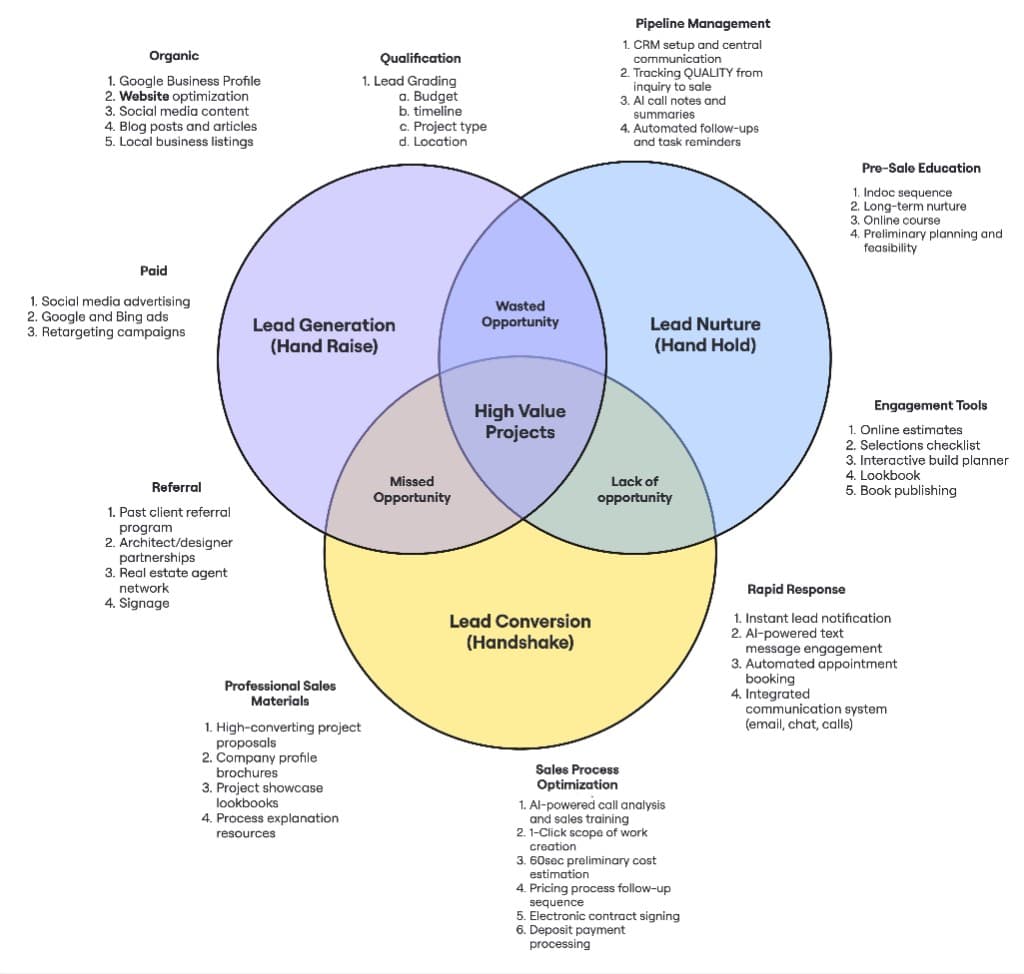
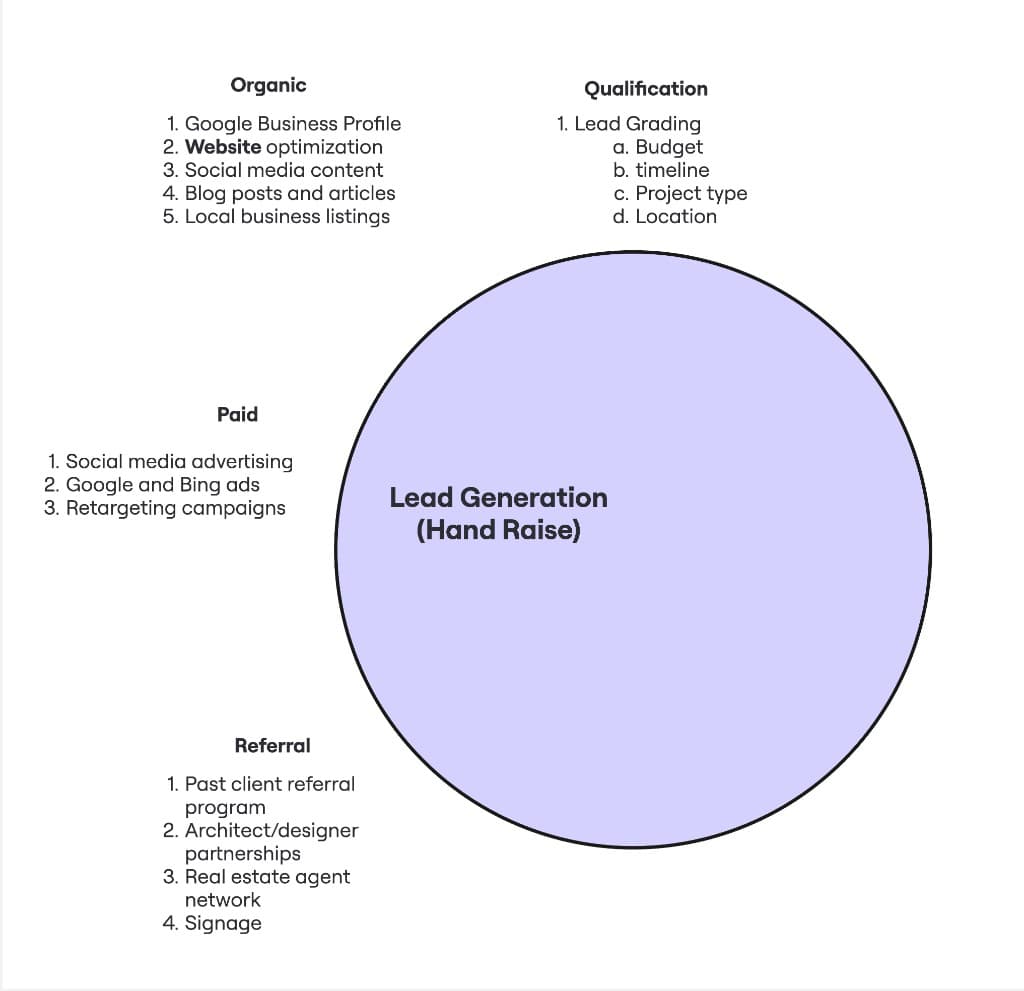
First circle — hand raise
Generation
Right homeowners find you, then get graded before your estimators burn hours.
Open pillar + workshop →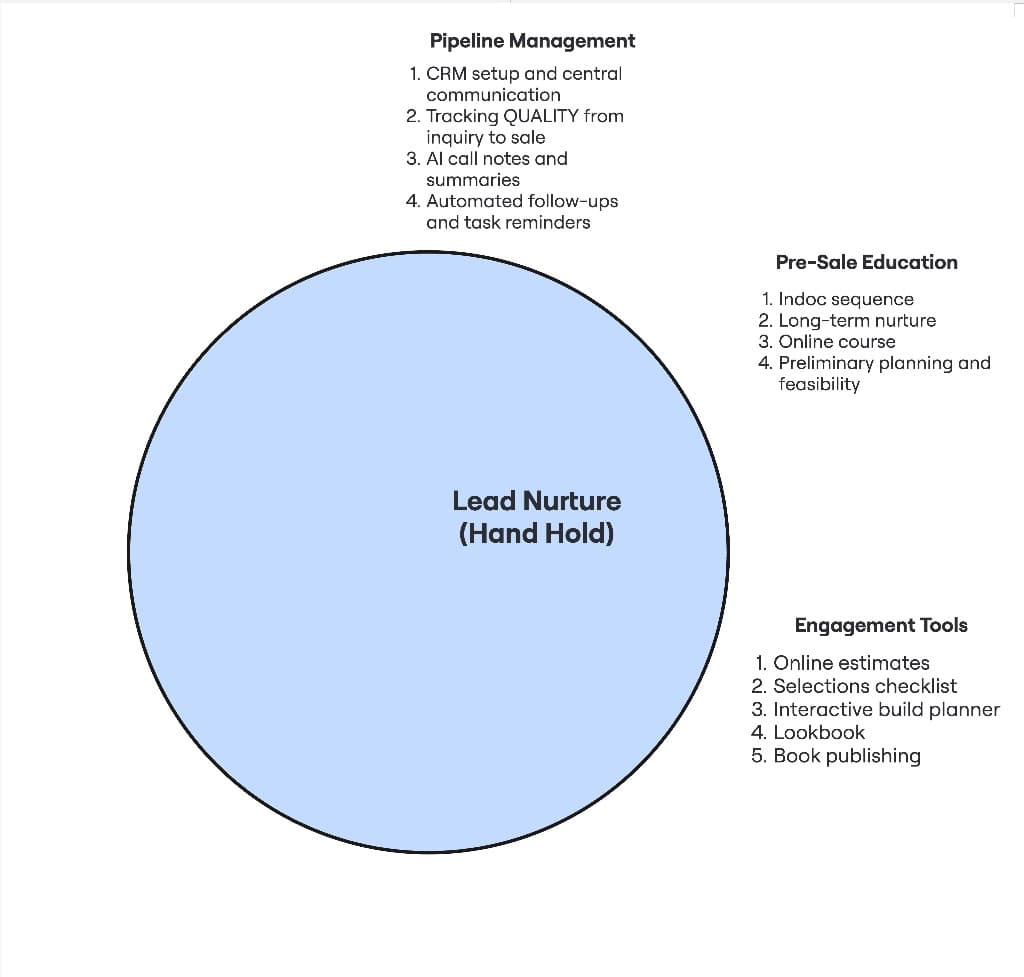
Middle circle — momentum
Nurture
Speed-to-lead, pipeline discipline, and education between interest and signature.
Open pillar + workshop → This playbook
Third circle — signed work
Conversion
A repeatable sales process that does not depend on one heroic estimator.
Open pillar + workshop →If you want priorities by revenue stage, the Builder Growth Roadmap maps the same sequence across Stage 1 ($0–$500K) through Stage 5 ($5M+) so you can see what to tighten first at your current size.
01Write a useful brief before choosing the design
TL;DR
A website brief should connect the work you accept, the homeowner's questions and the next conversation.
- List real services and the area you can support.
- Read enquiry and sales evidence before diagnosing the site.
- Give each major page a clear purpose.
Begin with the work the business wants the website to support. List accepted services, preferred projects and genuine exclusions separately. Include the service territory and delivery capacity. Do not turn a photographed premium project into an implied minimum budget for every enquiry.
Review the current experience before declaring a rebuild necessary. Look at where visitors arrive, what they ask, which pages they use and what happens after contact. Read a sample of actual enquiries. If suitable people submit successfully but wait three days for a call, the first constraint may be follow-up rather than design.
For each main page, write the reader's question and the intended next action. A renovations page helps a homeowner evaluate your renovation capability and process. A project story demonstrates a particular kind of experience. A cost explanation helps someone understand assumptions. Those pages can support one another without trying to become the same page.
Save the evidence required for the brief: project details, approved photos, client feedback, credentials, service boundaries and the current first-step offer. Someone writing from a blank design template cannot responsibly invent these facts.
The finished brief should let the builder, writer and developer make the same decision. It also gives you something concrete to review before discussing colours, animations or a new platform.
Find the wider marketing constraint first — For project economics, demand and the full lead-to-sale plan.
02Make service and area clear on the first screen
TL;DR
A homeowner should quickly understand what you build, where you work and whether their enquiry belongs here.
- Use plain service language.
- Name the area the business actually serves.
- Pair the introduction with relevant project imagery.
Cameron's website commentary starts with a simple example: say the work and the location. A clever headline that never says 'custom homes', 'renovations' or the actual territory makes the reader do unnecessary work. The same applies to a service page reached directly from search.
Write the opening in words a homeowner would use. Explain the service, the area and one meaningful part of your approach. Keep the distinction concrete. Early builder involvement during design, experience with substantial renovations or a clear feasibility process can be useful if your business actually delivers it.
Show imagery that supports that statement. A high-end new-home image can confuse a visitor arriving for an extension if nothing explains the connection. Use actual work where permissions allow, label design imagery honestly and avoid presenting stock or renders as completed projects.
Keep critical answers easy to find. Service areas should not require a hunt through the footer. Explain reasonable boundaries and give uncertain homeowners a way to ask. Being outside a preferred suburb is not automatically outside the accepted territory.
Then introduce the next step. State what the first conversation is for and who responds. Use only a response promise the team can keep. A polished page saying 'we call today' loses credibility if an unattended inbox is the real operating process.
03Give services, projects and useful local information distinct pages
TL;DR
Build a small, connected page structure around real buyer needs and evidence.
- Separate services that involve different decisions.
- Link service explanations to relevant projects.
- Add area detail when it provides useful substance.
A single page listing every service leaves little room to explain each one. Give meaningful services their own pages when you can provide a useful answer: the work included, who it suits, the process, important decisions and appropriate examples.
A service page should contain enough information to help someone evaluate fit. It should not simply repeat the homepage with another heading. For substantial renovations, homeowners may need to understand investigation, occupied-home disruption and the relationship between existing conditions and price. A custom-build page may need to explain design coordination and when the builder becomes involved.
Use project pages as supporting evidence. Link a renovation story from the relevant service explanation, then let the story point back to the service and its next step. Link a process guide where it answers a real question. Descriptive links help the reader understand the destination before clicking.
Area information should be genuine. You can explain an actual service territory even before every suburb has a completed project. A separate area page needs enough local knowledge, relevant evidence and practical detail to be useful. Do not create a large collection of identical pages by swapping place names.
Keep navigation understandable. A visitor should find services, work, process and contact without an elaborate menu. A paid campaign landing page can have a narrower focus than the full website. Choose the structure for its traffic and task rather than deleting useful navigation everywhere.
Plan useful service and local-search pages — For genuine area relevance, business visibility and search verification.
04Turn a project gallery into an inspectable story
TL;DR
Explain the brief, constraint, decisions and result so photos demonstrate capability.
- State what the project was trying to achieve.
- Explain an important decision and its evidence.
- Keep design, construction and completed stages distinct.
A gallery shows taste. A story helps a homeowner understand how your team thinks. Choose a project representative of work you accept and collect the facts before writing. Record the initial brief, the project type, the stage, a useful constraint and the decisions that followed.
Open with the homeowner's goal. Explain what had to be resolved and why it mattered. Then show the work that addressed it: investigation, design coordination, a material decision or a change in sequence. Place progress and finished images beside the explanation they support.
Be precise about the result. If a project is at planning stage, say so. If an agreed scope has not been built, do not write it as a completed outcome. Budget bands need permission, date, scope and inclusions. An early estimate must not become a final-price claim when reused in the website copy.
Illustrative example: a renovation story could explain that the client wanted more usable living space, while the existing structure required investigation. Show the relevant condition, describe how the team and designer considered options, then explain the chosen scope. This is a writing example, not a claim about a Contractor Scale client's building project.
Finish with the lesson relevant to another homeowner. It might be why early investigation mattered or why a particular brief needed coordination. The useful detail is the process someone can evaluate, rather than a collection of adjectives about exceptional workmanship.
Capture and write project evidence — For source collection, approvals and reuse across articles, posts and follow-up.
05Put the right proof beside the decision it supports
TL;DR
Use verified project evidence and feedback to answer specific concerns, without strengthening the underlying claim.
- Match proof to the service and question.
- Preserve original testimonial meaning.
- Verify credentials and third-party recognition.
A homeowner wondering about renovation disruption needs different reassurance from someone comparing architectural new-build experience. Use the proof that fits the concern. A relevant project explanation can be more useful than a long row of unrelated praise.
Ask clients what they appreciated and what became clearer during the process. Keep the original feedback and secure permission for publication. If they praise communication, use that. Do not rewrite it into a claim that the project was on budget, faster than competitors or more profitable unless those facts are separately supported.
Show credentials accurately. A licence, membership, award or insurance statement needs to belong to the business, be current and have the appropriate scope. Explain relevant conditions on a guarantee rather than inventing broad protection from a logo. Do not add badges simply because a template has a space for them.
For website acquisition, the Chris De Lury Builders case records a signed custom build from Google Ads in Christchurch. It shows a connected marketing path through relevant pages and follow-up. It does not isolate a website redesign's effect or establish a standard conversion rate. Present the case at that level.
Proof also needs maintenance. Review old testimonials, project stages and published business details. Check links to the original review or case where available. A specific, accurate example is stronger than making every page repeat the same broad claim of expertise.
Read the Christchurch search-to-build case — A named example of a connected journey, without treating the site as the only cause.
06Explain the process, cost assumptions and first engagement
TL;DR
Help homeowners understand what can be decided now and what needs further investigation.
- Show the stages your business actually follows.
- Explain what changes cost and confidence.
- Use paid investigation where its scope creates value.
A homeowner needs to know how an idea becomes a construction agreement. Explain the actual sequence from first discussion through discovery, design or investigation, pricing and commitment. Different project types may follow different paths. Avoid presenting one preliminary process as mandatory for every residential job.
Cost guidance can be useful without pretending to price an unknown project. Explain the variables: scope, existing conditions, access, design, specification and the investigations still required. When publishing a range, state its period, inclusions, exclusions and assumptions. Do not reuse an old project price as a promise for a new enquiry.
If the next stage is paid feasibility or preliminary work, explain what the homeowner receives. Name the investigations and outputs, the fee and tax treatment, expected timing, exclusions, ownership or use conditions and any credit towards later work. The promise should be a useful decision, not guaranteed finance, consent or a final contract price.
Where the initial step is a free project conversation, say what it covers. It may establish fit and identify the right investigation. It should not imply that the builder will provide hours of estimating or design at no charge. Equally, a homeowner asking about fees deserves an explanation rather than being dismissed as a price shopper.
Keep the website and sales conversation aligned. If the page promises a feasibility review but the team only offers a brief introductory call, fix the wording or process before sending more people to it.
Explain scoped feasibility and preliminary work — For discovery, appropriate planning commitments and proposal conversations.
07Make one primary enquiry action usable on a phone
TL;DR
Reduce uncertainty and friction while collecting enough information to choose a useful conversation.
- Explain what happens after the action.
- Ask questions needed for the next decision.
- Test labels, errors, touch targets and confirmation.
Choose one primary action for the page. A homeowner service page might say 'Discuss your renovation' or 'Request an initial project call'. These are adaptable examples, not Contractor Scale's agency assessment offer. Make the label fit the actual conversation and explain what commitment it involves.
Keep the enquiry form proportionate. Ask for reliable contact details and the project context needed to route it, such as service, location and a short description. Budget and timing questions can help if the business uses them well. Allow 'not sure yet' where uncertainty is legitimate. A preferred budget is not automatically a rejection rule.
Use clear labels rather than relying only on text inside an input. Check that errors identify the problem and preserve completed answers. Test the form with a phone keyboard, autofill and a small screen. A fixed header, chat launcher or cookie panel should not cover the next button.
After submission, confirm what happened and what comes next. If booking follows the form, check the available times, meeting purpose and reminder path. A calendar visible on screen does not establish that the right person receives the appointment.
Resources or estimate tools can be useful later, but they are additional systems to maintain. For now, one clear, reliable enquiry action is enough. Do not add five competing offers before the first capture and response path works.
08Verify enquiry capture and the human handover
TL;DR
A successful-looking form needs durable capture, correct routing and an owner who can act.
- Inspect the saved record, not just a success message.
- Preserve source and project details.
- Check notification, response and fallback paths separately.
Trace one controlled test through the full journey using an authorised test recipient. Confirm the submission is saved with the intended service, contact details and project answers. Then verify it reaches the correct business pipeline and the person responsible for responding.
Check the website context. Preserve the page or resource, campaign details where supplied and the time of enquiry. If a visitor arrives through several pages, keep the recorded landing and submission context distinct where your measurement supports it. Do not overwrite an unknown source with a confident channel guess.
Notifications are another step. Prove that the right person receives the intended notification and understands the task. An integration returning success is not evidence that the caller saw it. Test the appropriate follow-up receipt too, without accidentally enrolling real prospects in a test sequence.
Review failure handling. What happens if the connection is unavailable, a notification fails or the assigned person is away? The page should not falsely report success after a failed save. The team needs a visible way to recover missed enquiries and a backup owner.
Keep automated receipt and human contact separate in reporting. A prompt confirmation is useful. It does not mean the homeowner has had a meaningful conversation. The site is the start of the sale; the handover determines whether that opportunity continues.
Set up response ownership and follow-up — For contact attempts, shared history, readiness and next actions.
09Check discovery, performance and the rendered experience
TL;DR
A useful page must be reachable, understandable and usable under the conditions visitors actually experience.
- Check public pages and their search settings.
- Measure loading, interaction and layout stability.
- Inspect the actual mobile journey.
Check that important public pages load, have the intended canonical address and are not accidentally excluded from indexing. Give each a descriptive title and heading. Confirm useful pages are linked from relevant content and navigation. A sitemap complements those paths; it does not guarantee indexing.
For Core Web Vitals, current Google guidance measures Largest Contentful Paint for loading, Interaction to Next Paint for responsiveness and Cumulative Layout Shift for stability. Its good-experience targets are LCP within 2.5 seconds, INP below 200 milliseconds and CLS below 0.1. Use the linked primary guidance and actual reports. These targets do not promise a particular rank or conversion rate.
Inspect large hero images, galleries, video embeds and third-party scripts. Use appropriately sized imagery and reserve space so content does not jump while loading. Diagnose the measured issue before choosing a platform or buying another optimisation tool.
Lab tools help investigate. Available real-user reports show how visitors experience the page; a low-traffic page may lack enough field data. Keep those evidence types separate. A good test on your office connection does not establish that every visitor has the same result.
Finish with the rendered journey on desktop and a real phone. Check headings, contrast, readable text, navigation, menus, anchored links, forms and recovery from errors. A successful build proves the code compiled. It does not prove that the homeowner can complete the intended action.
10Measure useful enquiries and decide whether to improve or rebuild
TL;DR
Evaluate the site by verified enquiries and sales progression, then fix the diagnosed constraint.
- Keep clicks, submissions and conversations distinct.
- Use the same definitions before and after changes.
- Scope a rebuild only when improvement is insufficient.
Measure page views and actions, but be clear about what each means. A phone-link tap is not a completed call. A download is not a project enquiry. Google's recommended generate_lead event can measure a submitted form or information request when correctly implemented. It is not proof that the enquiry was saved or suitable.
Connect verified submissions to the pipeline where possible. Review project fit, meaningful conversations, agreed next steps and signed work. Record what the homeowner says helped them decide. Preserve unknown attribution and sales lag rather than forcing every opportunity into a tidy report.
Use a stable comparison. Keep a dated record of changed pages and forms. Compare traffic with similar intent and enough time to progress. Small samples can swing heavily after one enquiry, so avoid treating a short-term percentage movement as a proven design effect.
Then choose the intervention. If service clarity, project stories or a form handover can be improved within the current site, do that. A rebuild deserves a concrete reason: structural constraints, maintainability or technical limitations that prevent the agreed outcome. A checklist score alone cannot diagnose whether the site or the response process is the constraint.
Contractor Scale includes a campaign landing page or agreed website improvements within Growth. A full rebuild, design assets and bespoke development are separately scoped and itemised. Use the service explanation when evaluating that help; this walkthrough remains useful if you brief your own website team.
Run the 21-point builder website checklist — A structured inspection prompt to use alongside the deeper checks above.
See Contractor Scale's home builder website service — For delivery, scope and how website work fits the managed Growth System.
Who this guide is for
- Custom-home builders, substantial renovators and design-and-build firms reviewing an existing website or briefing a new one.
- Owners receiving visits but unsure whether the site communicates fit or creates useful project conversations.
- Teams that want website, enquiry capture and follow-up connected rather than handed over as separate projects.
Common mistakes builders make
Most of these problems are not caused by effort alone. They come from the wrong sequence, the wrong assumptions, or a missing layer in the system.
- Designing around a gallery while leaving the service, area and first step unclear.
- Presenting renders, design agreements or early estimates as completed-project proof.
- Making paid preliminary work a universal requirement or treating fee refusal alone as poor fit.
- Counting a phone tap, form submission and qualified sales conversation as the same outcome.
- Claiming the enquiry journey works from a success screen without reading the saved record back.
- Using fixed conversion-rate bands or a checklist score to decide automatically that a site needs rebuilding.
Frequently asked questions
Do I need a completely new builder website?
Not necessarily. First check service clarity, relevant proof, the enquiry path, performance and what happens after contact. Many improvements can fit an existing site. A rebuild needs a specific structural or maintenance reason and a defined scope. A polished replacement will not resolve unassigned enquiries or slow human follow-up on its own.
What should the homepage say?
State the work you do, the area you serve and a meaningful part of your approach. Support that with relevant project imagery and proof, then explain the first conversation. Avoid making visitors infer your service from a beautiful photo. The same clarity matters on service pages reached directly from search or an advert.
Should a builder website show prices?
Useful cost guidance can help when its scope, period and assumptions are clear. Explain what changes the number and what still needs investigation. Do not imply a fixed construction price from an unknown brief. If publishing project budgets or ranges, confirm accuracy and permission, including what the number covers and excludes.
Should the main action be paid feasibility?
Only when it fits the actual project and your service. Some work warrants detailed paid investigation before construction pricing; other work follows a simpler path. Explain the output, scope, fee, tax, timing and terms before commitment. The first website action can remain a project conversation that determines the appropriate next step.
What is a good website conversion rate for a builder?
There is no universal rate that diagnoses every builder site. Traffic intent, definitions, project fit, geography and sample size change the result. Track verified enquiries, suitable conversations and progression using consistent definitions. A high rate of easy downloads or irrelevant submissions may be less useful than fewer enquiries that become appropriate projects.
Does website work include a full rebuild on a managed plan?
A campaign landing page or agreed website improvements are included within Contractor Scale's Growth scope. A full rebuild, design assets and bespoke development are separately scoped and itemised before commitment. Use the current service and proposal details to establish what is included. Do not infer a major rebuild from a general promise of website support.
Original teaching and evidence
Use the recordings to hear the explanation in Cameron’s own words. Historical fees, software screens and examples belong to their original context; choose your process and terms for the work you actually deliver.
- Cameron's three jobs for a builder website
Original short commentary, 0:00–2:55. Service and area clarity, useful engagement devices and project stories. The written walkthrough adds Contractor Scale editorial guidance; this is not a full website webinar.
- Website capture in the wider marketing system
Full marketing recording. Website and organic assets at 13:08; qualification at 14:10; measuring the path beyond front-end lead cost at 15:24.
- Current Core Web Vitals guidance
Google's definitions of loading, responsiveness and layout stability, checked 13 October 2026. These measures help assess experience; a good score does not guarantee rankings or enquiries.
- Google Analytics lead-event guidance
Google's recommended generate_lead event applies when a user submits a form or information request. Recommended events require setup; a tracking script alone does not establish correct capture.
Put the process in context
See where this fits in your building business
The Builder OS Map sets out 157 workflows, from marketing through handover and warranty. Use it to locate the process in this guide and see where an owner, hand-off or next step needs to be clearer.
Get the free Builder OS MapRegional implementation context: New Zealand home builder marketing and Australia home builder marketing.