
Google Ads for Home Builders: Connect the Search to the Sales Conversation
Work through the campaign, enquiry page and follow-up as one path. Cameron's Google Ads case explains the hand-over; this written setup and review process is supported by current Google documentation.
Watch the workshop below, or jump to the written walkthrough and work through the steps.
Cameron Upton · Case walkthrough
Google Ads into Home Building Projects: Chris Builders System Overview
This recorded case follows a search enquiry through an estimate, qualification, follow-up and booking. It illustrates how the parts connect; it is not a full campaign-setup course or a forecast of your results. The written guide adds the practical setup and measurement checks.
Demand playbook · About 20 min read · Updated October 2026
Teaching by Cameron Upton, Contractor Scale founder and trade-qualified engineer turned strategist.
Written guide adapted by Contractor Scale from Cameron’s recorded explanations and source-backed editorial guidance. Suggested scripts and worked examples are labelled; they are not transcript quotations. See the original teaching and evidence.
What you get from this guide
A Defined Search Campaign
Connect an accepted service, real territory, relevant searches and a deliverable first offer.
A Working Enquiry Path
Check the landing page, saved enquiry, owner notification and useful conversion goals before launch.
Quality You Can Review
Follow enquiries through conversations and sales stages before changing spend or targeting.
The problem this playbook fixes
A paid search click is an opportunity to answer a homeowner's question. It is not a qualified project or a contract. The campaign chooses which opportunities to buy; the page explains why to respond; the team handles what happens next. If those parts are disconnected, the dashboard can look active while the business sees little progress. This playbook gives you a practical Search campaign and review sequence, without universal cost-per-lead targets or a promise of signed work.
How this fits the Growth System
Demand is how the right homeowners find you, trust you, and put their hand up before a competitor takes the attention. Without it the next two stages have nothing real to work with.
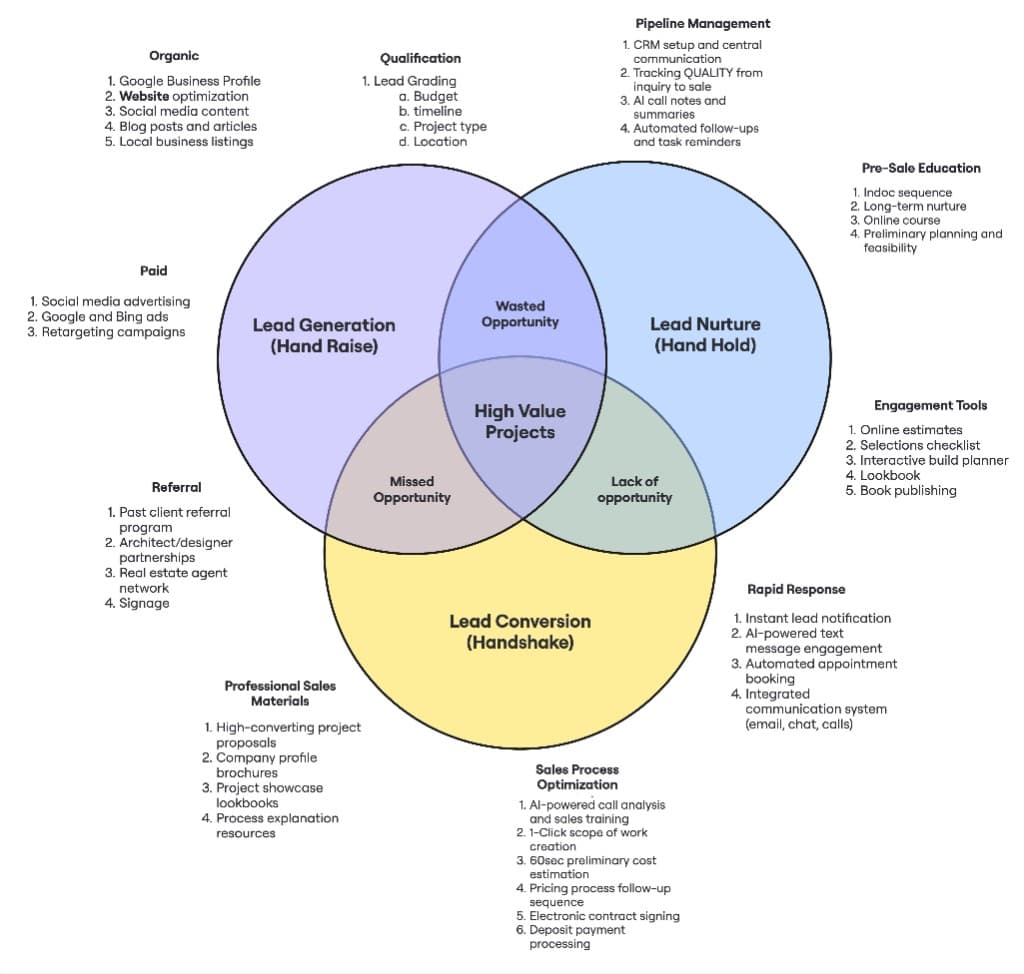
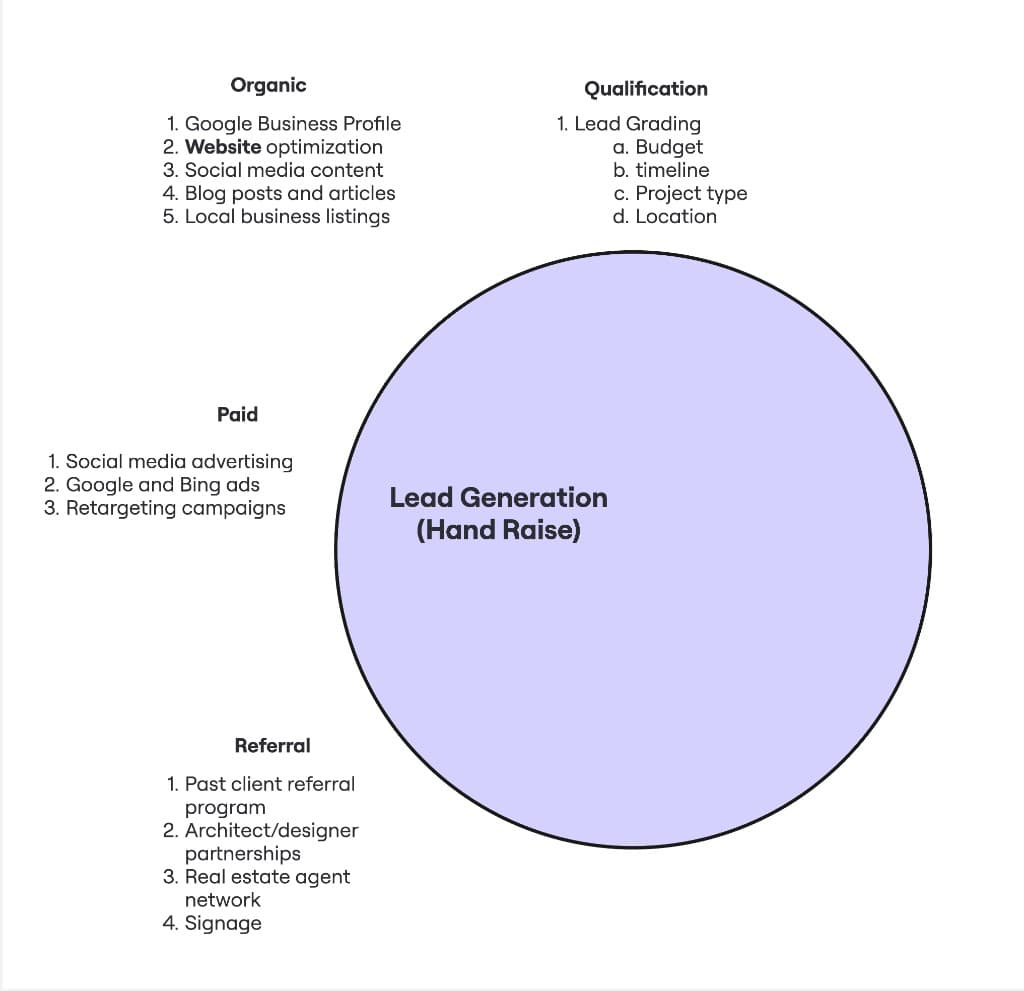 This playbook
First circle — hand raise
Generation
Right homeowners find you, then get graded before your estimators burn hours.
Open pillar + workshop →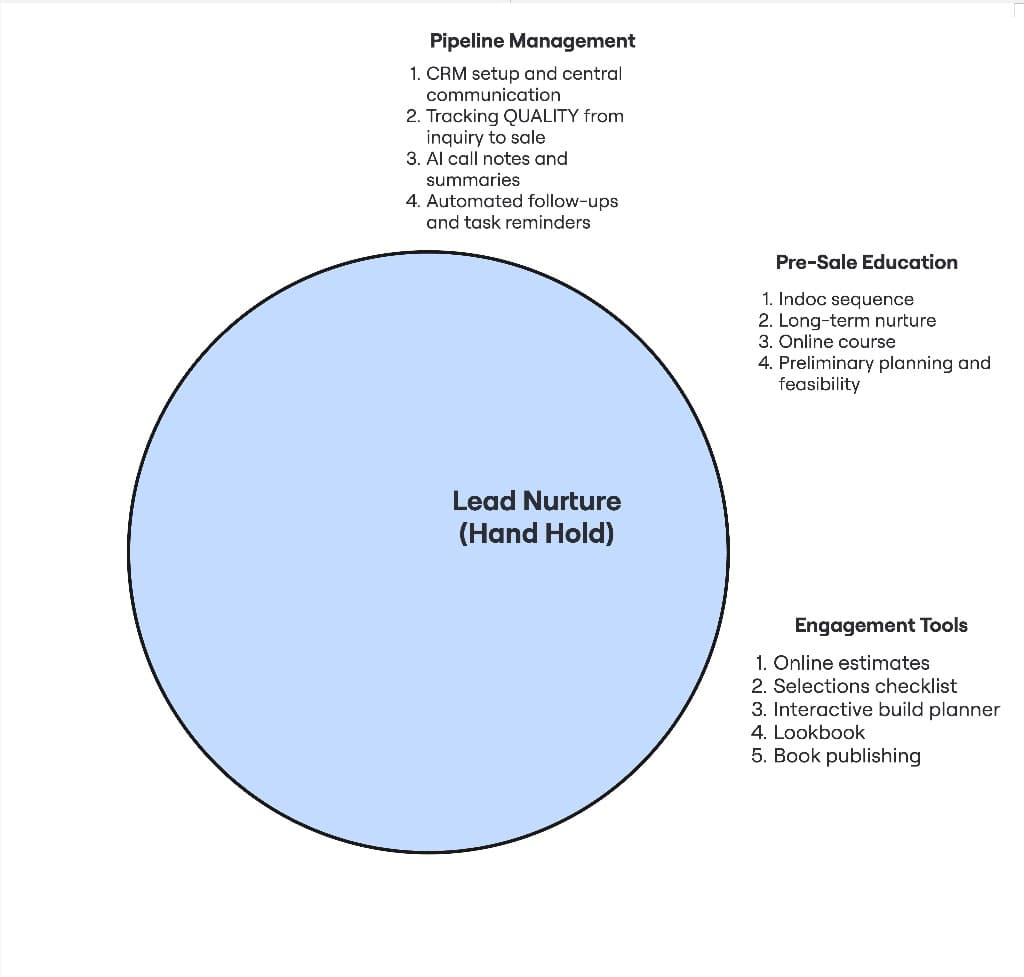
Middle circle — momentum
Nurture
Speed-to-lead, pipeline discipline, and education between interest and signature.
Open pillar + workshop →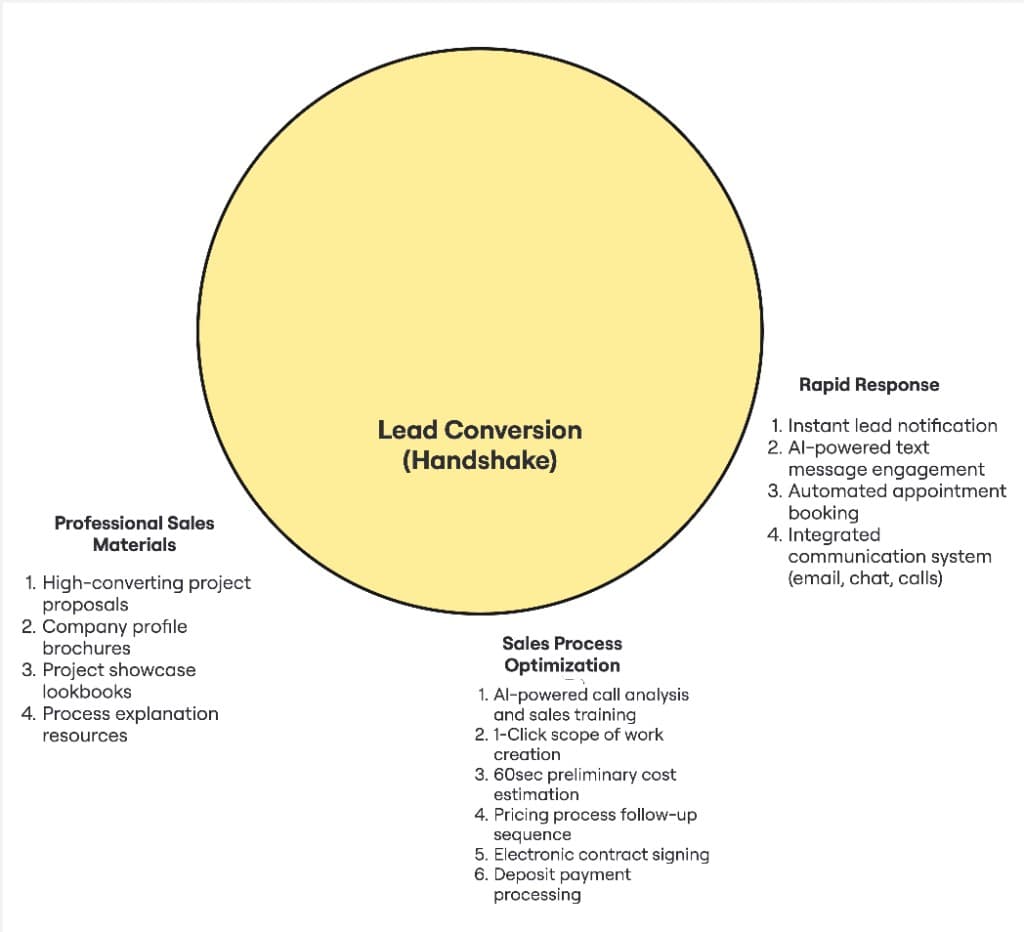
Third circle — signed work
Conversion
A repeatable sales process that does not depend on one heroic estimator.
Open pillar + workshop →If you want priorities by revenue stage, the Builder Growth Roadmap maps the same sequence across Stage 1 ($0–$500K) through Stage 5 ($5M+) so you can see what to tighten first at your current size.
01Define the Project, Offer and Affordable Test
TL;DR
Start from work you accept and a response you can deliver, then bound the spend and review plan.
- Keep preferred work separate from hard exclusions.
- Use contribution and sales history rather than contract value alone.
Write the service the campaign will promote, the territory and the first step offered to homeowners. A custom home, extension and standalone kitchen can require different messages and economics. Do not blend them simply because the business performs all three.
List accepted work, preferred projects and actual exclusions separately. An ideal scope shapes priorities; it does not justify refusing other accepted projects. Missing budget, plans or timing remains a question for the conversation.
Define the offer in plain language. Explain what the initial conversation covers and what it does not. If you offer a cost indication, state the assumptions and what requires further investigation. Do not promise design work, a fixed price or a start date that the business cannot provide.
Set an affordable learning allowance with the person responsible for cash flow. Contract value is not acquisition budget. Use contribution, sales costs, delivery capacity and the time until payment to assess the risk. Separate media spend from management and page work.
Hypothetical planning example: the business wants four additional extensions, but can only handle two new sales meetings a week. The test needs a suitable volume of conversations, not a target of hundreds of forms. Set a review date, an owner and the conditions that would stop spend immediately, such as a broken enquiry path.
Record the questions the test must answer: whether relevant searches exist, whether people respond, whether the projects fit, and whether the team can progress them.
Plan the acquisition goal before buying clicks — Work backwards from forward workload and capacity rather than choose a universal lead target.
02Choose a Search Structure You Can Understand
TL;DR
Use campaigns for decisions that need separate settings, and ad groups for related searches sharing one offer.
- Keep brand and new-customer demand visible separately.
- Review networks and optional automation deliberately.
This walkthrough focuses on Google Search advertising. A campaign holds settings such as budget and geography. Within it, ad groups connect related keywords and ads to a suitable destination.
Separate campaigns when services genuinely need different budgets, locations, goals or management decisions. Use ad groups when searches can share the same offer and landing-page explanation. Do not fragment a small market into dozens of tiny campaigns merely to look organised.
Keep searches for your company name visible separately from service searches. Someone already looking for the business brings different demand from a homeowner comparing local builders. Blending the two can make acquisition reporting look stronger than it is.
Review network settings. Search partners are a distinct traffic source; record whether they are included and review their outcomes separately where reporting allows. Any Display reach should be an intentional part of the plan, rather than an unnoticed addition.
Inspect optional automation settings before launch. AI Max can broaden search matching and use text customisation or final URL expansion. Those settings change which searches, wording and destination pages may be used. Understand the current controls and check destinations before enabling them. Pinning an ad line alone is not sufficient to protect it when final URL expansion applies.
Save the intended settings and read them back after setup. A tidy campaign name does not prove the targeting, goal or landing page is correct. Keep the first structure small enough that a responsible person can explain every part of it.
Understand Google's Search Network — Review Google Search and search-partner reach as deliberate settings.
Check current AI Max controls — Understand expanded matching, generated text and final URL expansion before using them.
03Build Keywords from the Homeowner's Question
TL;DR
The keyword controls matching; the actual search term tells you what someone asked.
- Exact and phrase match still consider meaning and intent.
- Research service, local and planning searches separately.
Begin with phrases describing the service people want. For a business accepting extensions, “home extension builder” and a relevant local variation can seed the research. For custom homes, start with custom-build or design-and-build terms that accurately describe delivery.
Add planning questions only when the page can answer them and the business can serve that stage. A cost query may lead to a serious project, as Cameron's case walkthrough illustrates. It can also be early research. Do not assume every cost search is ready to buy or automatically exclude “cost” and “price”.
Use Keyword Planner for ideas and estimates in the intended location. Check the search volume and forecast against that service and territory. Forecasts are planning estimates, not promised traffic or enquiries. Very narrow phrases can have little observable demand.
Understand match types. Exact match can show for the same meaning or intent; phrase match can show for searches containing the keyword's meaning. Neither requires only a literal word-for-word search. Broad match reaches related searches more widely. Google recommends pairing it with Smart Bidding.
A bounded first test can use tightly related exact or phrase keywords when greater steering is useful. That is a management choice, not a rule that broad match always fails. Broader reach needs reliable goals, active review and the ability to assess the enquiries.
Keep a reason beside each keyword group: accepted service, expected question and matching page. Review actual search terms after launch rather than assume the initial list describes everything you bought.
Read Google's current keyword-matching guidance — Check meaning-based matching and the different scope of exact, phrase and broad.
Understand Keyword Planner estimates — Use forecasts for planning without treating them as guaranteed performance.
04Check Locations and Exclusions Together
TL;DR
Target the market you can serve, then verify that exclusions and location options do not contradict it.
- Project location and the homeowner's current location can differ.
- Location targeting is a best-effort signal, not a boundary guarantee.
Start with the business's actual service area, including places needing a case-by-case discussion. Review positive locations, radius targets and excluded locations together. A campaign can target a district while an exclusion silently blocks part of it.
Check advanced location options. “Presence” focuses on people likely to be in or regularly in the selected area. “Presence or interest” also includes people interested in that area. Decide which fits the campaign rather than accept a default without understanding it.
Presence can suit a local service campaign. But someone planning a home in your area may currently live elsewhere. If those projects are accepted, account for that situation intentionally. The enquiry form should ask where the project is, because the person's device location does not establish the site address.
Use genuine delivery constraints for exclusions. Do not infer a hard exclusion from a preferred suburb, project value or resident stereotype. If an exact negative location conflicts with an intended positive, resolve the conflict and verify both sides afterwards. Preserve unrelated settings.
Google states that location targeting uses several signals and is not perfectly accurate. Review the location reports and the actual project locations in enquiries. A search mentioning another place may require investigation rather than an immediate exclusion.
Keep a saved territory note that another manager can understand. After a change, read the live targets, exclusions and option settings back. A change-history entry proves an attempt was recorded; it does not by itself establish the final configuration.
Check Google's advanced location options — Distinguish presence from interest before choosing a local targeting rule.
Read location-targeting limits — Understand why the form and enquiry conversation still need to confirm the project area.
05Exclude Wrong Intent Without Blocking Good Work
TL;DR
Negatives need a factual reason, the right match type and a check against accepted services.
- Check account, campaign and ad-group exclusions.
- Search terms and later lead quality should inform the decision.
Build an initial exclusion list from work the campaign genuinely does not seek. Employment searches may belong outside a homeowner-acquisition campaign. A standalone fence query may be unsuitable for a business that explicitly excludes that service. Neither example justifies copying a universal builder negative list.
Read existing exclusions at account, campaign and ad-group levels, including shared lists. An exclusion inherited from an older campaign can block the current offer. An enabled keyword record can itself be negative; check its role and owning level before calling it a traffic target.
Negative match types behave differently from positive matching. Negative broad requires all its terms, in any order. Negative phrase requires the terms in that order. Negative exact blocks that exact search without extra terms. Negatives do not automatically cover close variants, so review relevant variations.
Use the narrowest exclusion that addresses the evidenced problem. Blocking “small” could remove an accepted compact custom home. Blocking “kitchen” could remove a substantial renovation that includes a kitchen. Blocking “cost” could remove a useful planning enquiry. Compare the whole query and resulting conversation with the actual service rules.
Read search terms regularly during launch, with frequency matched to spend and available data. Keep query, matched keyword, cost and conversion action visible. The report omits some low-volume queries for privacy, so do not claim it exposes every search.
Before adding a negative, write the reason and check for overlap with useful terms. After saving it, read it back with its match type and level. Preserve valid traffic while removing the specific wrong intent.
Read Google's negative-keyword rules — Apply the correct match behaviour and account for variations.
Use the search terms report correctly — Distinguish actual queries from keywords and understand the report's coverage limits.
06Make the Ad and Landing Page Tell the Same Story
TL;DR
The search, ad, destination and next step should describe one truthful service and offer.
- Use specific service, area and buyer benefit.
- Check responsive-ad combinations and mobile enquiry usability.
Write the ad for the question in its ad group. State the service and area plainly, then explain a useful first step. Support any claim with something the business can show.
Responsive search ads combine supplied headlines and descriptions. Google allows up to fifteen headlines and four descriptions, with thirty characters per headline and ninety per description. Make each asset understandable alone and in different combinations. Use pinning carefully where wording must appear, and check any expanded-URL settings separately.
Suggested headline examples for an extension campaign: “Plan Your Home Extension”, “Discuss Your Extension” and “Understand the Next Step”. These illustrate an offer; they are not proven winning ads. Add actual locality and evidenced differences where they fit. Do not insert Contractor Scale's territory policy into a homeowner's building offer.
The landing page continues the same explanation. Show accepted project types, real coverage, relevant project proof, the offer's inclusions and one main enquiry action. A focused page can help a campaign, but there is no universal conversion uplift or rule that every homepage is unusable. Evaluate the actual destination.
Ask enough to begin a useful conversation: contact details, project area, service and a brief description where relevant. Give unknown answers a valid path. Explain what happens after submission and link the privacy information where appropriate.
Test on a phone. Read the ad promise beside the page heading. Check images, text, buttons, form, confirmation and response timing. Every advertising asset should describe the service being delivered, rather than borrow unrelated project proof.
Check responsive search ad requirements — Use current asset limits and understand how wording can combine.
Improve the landing-page enquiry journey — Use the page workflow when relevant clicks are not becoming suitable enquiries.
See the builder website service — Understand website scope if the current site cannot support the campaign's message and response path.
07Set Conversion Goals and Prove the Saved Enquiry
TL;DR
Choose goals that represent useful progress, then verify tracking and delivery as separate systems.
- A button click is different from a submitted enquiry.
- Check campaign goals, primary actions and custom-goal exceptions.
Define the events before building tags. A page view, clicked phone number, submitted form, connected call and qualified conversation are different actions. Name them accordingly. A click on the submit button should not masquerade as a completed enquiry.
Choose which actions the campaign should optimise for. Primary actions are used for bidding when their standard goal is included. Secondary actions are normally observational, but actions included in a custom goal can be used for bidding regardless of that label. Read the campaign's selected goals as well as each action's setting.
Avoid counting one enquiry twice as separate primary outcomes through both an Ads tag and an imported analytics event. Check the actual configuration before assuming duplication. Decide the source of truth and the role of other observations.
Run an authorised, clearly labelled test through the landing page. Verify the saved record, source details, owner notification and confirmation. Separately inspect the event with the supported testing tools and check that it fires at the intended successful step. Tag presence alone is not proof.
For calls, use an available supported tracking method and define what it measures. A duration threshold can identify a longer call, but it does not establish project fit. Ask the owner to record what the conversation became.
Retain permitted source identifiers and campaign information with the enquiry for later comparison. Keep consent and privacy requirements within the actual setup. Remove internal tests from business reporting and avoid sending test activity back as a genuine qualified lead.
Check primary and secondary conversion behaviour — Understand which actions actually affect bidding, including custom-goal exceptions.
08Choose Budget and Bidding from Reliable Signals
TL;DR
The bidding strategy should match the goal, data and affordable spend; there is no universal graduation threshold.
- An average daily budget is not a strict daily cap.
- Avoid targets based on unverified leads or invented revenue.
Set the campaign's spend against the agreed test allowance. Understand Google's average daily budget and spending limits; daily spend can vary. Review the account currency and billing arrangement as well as the number entered in the campaign.
Choose bidding against the real objective. A click-oriented strategy seeks traffic. Smart Bidding uses conversion or value signals. If the signal is an unqualified form or a duplicated event, the system is being asked to optimise around that event, regardless of what the owner calls a good lead.
Google's current documentation describes Maximise conversions, Target CPA, Maximise conversion value and Target ROAS for relevant goals. Labels changed during 2026, so check the behaviour in the account rather than rely on an old tutorial's wording. Historical-data recommendations vary by strategy and campaign type. There is no single thirty-conversion rule for every builder, and a new account is not automatically prohibited from Smart Bidding.
For a value strategy, use values that represent a justified business outcome. A hypothetical contract size attached to every form can mislead the decision. Record who owns the value model and how later actual outcomes update it.
Leave room for learning and conversion delay when evaluating changes. Do not repeatedly alter budgets, targets and goals without recording why. Urgent problems such as broken tracking or wrong territory still need prompt correction.
Save the selected strategy, goal, budget, any target and review condition. The decision should be understandable from those facts, rather than a blanket preference for manual control or automation.
Read Google's Smart Bidding guidance — Check current strategy behaviour and its particular data recommendations.
Understand average daily budgets — Plan spend without assuming the average daily amount is a hard daily cap.
09Connect Search Enquiries to a Human Next Step
TL;DR
Respond with the submitted context, record readiness and give each active opportunity an owned next action.
- An acknowledgement is separate from a real conversation.
- Suitable early projects need a readiness checkpoint.
The campaign cannot make the sales call. Name the response owner and cover before launch. Set a response target the team can deliver, and give after-hours enquiries an honest expectation.
Use the details already supplied. Ask the next useful question rather than repeat the entire form. Confirm project type, area, scope and decisions made. Discuss budget and timing with context. Record unknown information neutrally and compare fit against actual accepted work.
Separate suitable and ready, suitable and waiting, explicit exclusion and not yet reached. A missed call does not prove the opportunity was unsuitable. A request to stop contact needs its own stopping rule.
Cameron's Chris De Lury Builders walkthrough connects Google search, a cost indication, qualification, follow-up and a booking path. The published Christchurch case records a signed custom build from Google Ads. That is evidence of a connected path in one case, not a forecast for another business. The guide does not republish the homeowner's personal or financial details shown in the recording.
Hypothetical application: a suitable extension enquiry is waiting for a design discussion. The owner sends an agreed example and records a checkpoint after that meeting. Initial chase messages stop. If the project becomes ready, the next conversation progresses the actual sales process.
Keep the history shared enough that cover can act. Promised material and agreed calls need owners and dates. Automation can support the commitments, but it should not invent a completed meeting or continue a sequence after someone has replied.
Read the Chris De Lury Builders search-to-sale case — Assess the published Google Ads outcome in its Christchurch custom-build context.
Build the enquiry follow-up and nurture process — Keep the real conversation and next commitment moving after the campaign delivers an enquiry.
Work through discovery and the sales next step — Clarify suitable project scope and progress toward a meaningful decision.
10Review Quality Before Expanding Spend
TL;DR
Compare useful conversations and later outcomes by source, with sales delay and missing attribution visible.
- Separate activity, enquiry quality and sales progress.
- Change the evidenced problem, then read the result back.
Start the review with delivery: spend, campaign eligibility, destinations and tracking health. If little is serving, check billing, approval status, schedule, keyword status, territory conflicts and available demand before assuming the budget is too low. Ad Rank considers factors beyond the bid, including quality and context; a higher budget does not purchase a guaranteed first position.
Then inspect actual search terms, project locations, valid enquiries, response coverage and suitable conversations. Those checks help locate the problem rather than blame the whole channel.
Define qualified progress in your own sales process. Google supports imported qualified-lead and converted-lead goals. A converted lead represents the step you define; it does not automatically mean a signed building contract. Choose a currently supported import method, check matching and timing requirements, and verify actual accepted results.
Keep unjoined outcomes visible. If a contract cannot be connected to the original campaign, do not assign it to the keyword you hope produced it. Record buyer-reported sources separately from captured attribution. Long sales cycles also mean a fresh campaign cannot be judged only by this week's signed work.
Hypothetical comparison: campaign A spends 1,200 budget units and produces twelve enquiries, four suitable conversations and two held meetings. Campaign B spends the same and produces six enquiries, four suitable conversations and three held meetings. Raw enquiry cost favours A; conversation cost is equal. Later outcomes and timing still need review. These are illustrative numbers, not currency-specific benchmarks.
If suitable traffic is weak, inspect matching and exclusions. If relevant clicks do not become enquiries, review the page. If valid enquiries go unanswered, repair ownership. If meetings stall, inspect sales progression.
Expand spend only where the evidence, capacity and cash flow support it. Record the intervention, preserve the baseline and verify the saved change. Review the new period with its own source data rather than call a budget increase proof of growth.
Understand qualified-lead and converted-lead goals — Define what later progress means before using it as a campaign signal.
Check offline conversion import requirements — Use a supported method and verify later outcomes rather than assume CRM labels reach the ad account.
Understand what determines Ad Rank — Review serving and position without assuming the highest bid guarantees the highest placement.
Who this guide is for
- Custom-home builders and renovators preparing a first managed Google Search campaign.
- Teams reviewing an existing account with unclear targeting, conversion goals or lead quality.
- Owners who want to understand the campaign-to-sale path well enough to assess the work being done.
Common mistakes builders make
Most of these problems are not caused by effort alone. They come from the wrong sequence, the wrong assumptions, or a missing layer in the system.
- Treating every click, form or phone-button tap as a qualified project.
- Copying a negative list without checking accepted services and useful historical conversations.
- Targeting an area while a location exclusion blocks it, or confusing the homeowner's device location with the project site.
- Letting expanded matching, generated text or destination changes happen without understanding the saved controls.
- Using unrelated proof or a promise on the ad that the landing page and team cannot fulfil.
- Optimising duplicated or weak conversion events while calling the goal signed work.
- Setting budget from headline contract value without contribution, cash-flow and capacity context.
- Expanding spend before checking enquiry response and downstream progression.
Frequently asked questions
How much should a home builder spend on Google Ads?
Set an affordable test using the service, market demand, contribution, sales cycle and capacity. Separate media from management and page work. Keyword forecasts can help planning, but there is no universal monthly budget or acceptable cost per lead for every builder. Agree the questions the test must answer and when to review it.
Should I use broad, phrase or exact match?
Choose the reach and steering your current goal and management capacity support. Exact and phrase still match meaning or intent, rather than only literal text. Broad reaches related searches more widely and Google recommends Smart Bidding with it. Review actual search terms and resulting projects regardless of the starting match type.
Can I exclude people outside our service area?
You can use location targets, exclusions and advanced options, but targeting is not perfectly accurate. Decide whether accepted homeowners living elsewhere need to be reached, then ask for the actual project location in the enquiry. Review positive locations and exclusions together so an intended market is not silently blocked.
Should cost and price searches be negative keywords?
Not automatically. A cost question can begin a serious building project or be early research. Check the whole query, destination and later conversation against accepted work. Exclude wrong intent with an appropriate match type. A blanket negative for cost, price or budget can remove enquiries the business would welcome.
Do we need thirty conversions before using Smart Bidding?
There is no universal thirty-conversion requirement across all strategies and campaigns. Check the current guidance for the selected strategy, plus the quality, volume and delay of the signals it would use. Reliable conversion goals and realistic targets matter more than following an old account rule without understanding its context.
What proves that the campaign is working?
Use a connected view of spend, valid enquiries, suitable conversations, meetings and later outcomes. Check response coverage and source attribution before judging quality. An early increase in suitable conversations is useful evidence, but not proof of contracts. Allow for the sales cycle and keep unmatched outcomes separate from confirmed campaign results.
Original teaching and evidence
Use the recordings to hear the explanation in Cameron’s own words. Historical fees, software screens and examples belong to their original context; choose your process and terms for the work you actually deliver.
- Google Ads search-to-sale case walkthrough
Full captions reviewed. 0:38–3:09 explains search, an estimate, qualification, nurture and booking. This is a case walkthrough, not a full campaign-setup course; private prospect details and historical title numbers were not republished.
- Chris De Lury Builders: published case
Named, published Christchurch evidence records a signed custom build from Google Ads. It supports this particular connected path, not a general forecast.
- Search advertising within acquisition planning
25:08–31:42: paid search, the enquiry destination and follow-up. The written campaign controls are editorial guidance checked against Google's current documentation.
- Google keyword matching
Current primary reference for positive match types. Checked 13 October 2026.
- Google negative keywords
Current primary reference for exclusion match behaviour and variants. Checked 13 October 2026.
- Google location options
Current primary reference for presence, interest and exclusions. Checked 13 October 2026.
- Google conversion action settings
Current primary reference for primary, secondary and custom-goal behaviour. Checked 13 October 2026.
- Google Smart Bidding
Current primary reference for strategy behaviour and strategy-specific data guidance. Checked 13 October 2026.
Put the process in context
See where this fits in your building business
The Builder OS Map sets out 157 workflows, from marketing through handover and warranty. Use it to locate the process in this guide and see where an owner, hand-off or next step needs to be clearer.
Get the free Builder OS MapRegional implementation context: New Zealand home builder marketing and Australia home builder marketing.